
Zapya
Screenshots
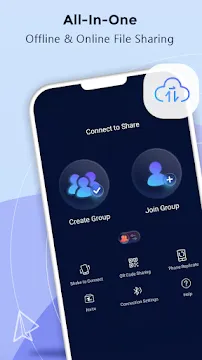
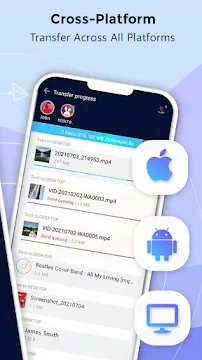
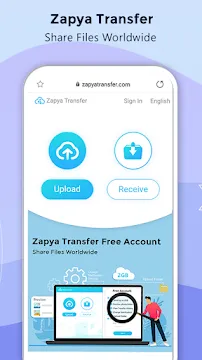
Zapya is a fast and reliable file-sharing app designed for Android users. It helps you send photos, videos, apps, and documents without using mobile data. The app works smoothly on most devices and delivers high-speed transfers in just seconds. With its simple interface, anyone can start sharing files right away.
Moreover, Zapya supports multiple sharing methods. You can connect with friends using QR codes, group sharing, or even offline Wi-Fi hotspots. This flexibility makes the app perfect for quick transfers at home, school, or work. In short, Zapya gives you a smart and easy way to move your files.
Zapya – The Core Technology: Offline File Transfer Mastery
Zapya stands out as one of the fastest file-sharing tools on Android. It works smoothly even when you have no internet connection. Its offline system makes sharing photos, videos, apps, and large files simple and stress-free.
In addition, the app uses advanced technology to create a stable and private connection between devices. As a result, you can send content anytime and anywhere.
The “No Internet? No Problem!” Mechanism
Zapya uses Wi-Fi Direct and Local Hotspot technology. These tools allow two Android devices to talk directly to each other. You do not need mobile data or an existing Wi-Fi network.
How It Works
- Zapya creates a temporary local hotspot.
- Your second device joins this hotspot.
- Both phones form a direct, peer-to-peer link.
- Files travel across this private network at high speed.
This system works even in places with no signal. It works at home, outdoors, or in crowded areas.
Clear Analogy
Think of Zapya as building a small, high-speed bubble network between two phones.
This bubble exists only for a moment—just long enough for the transfer.
It acts like a private bridge that moves files quickly and safely.
Lightning Speed Performance
Zapya is known for speed. It can reach up to 10MB/s, which is up to 100 times faster than Bluetooth.
Why It’s Faster
- It uses Wi-Fi technology instead of low-energy Bluetooth.
- It handles large files better and maintains stable speed.
- It avoids internet servers, so the transfer stays local and direct.
Real-World Benefits
- You can send gigabyte-sized videos in seconds.
- Apps and full folders move instantly.
- Sharing with multiple devices feels effortless.
- You save time, battery, and data.
In short, Zapya turns file sharing into a fast, offline, and hassle-free experience.
Zapya Key Features & Functionalities
Zapya is a fast and reliable file-sharing app for Android. It helps users move files quickly without mobile data. It also works across different platforms, making sharing simple for everyone.
Zapya focuses on speed, convenience, and flexibility. Its tools make it easy to transfer photos, videos, apps, and even full device data. Below are the main features that make Zapya a powerful sharing solution.
Cross-Platform Compatibility (The Universal Sharer)
Zapya works smoothly across multiple platforms.
You can share files between:
- Android phones and tablets
- iOS devices
- Windows PC
- macOS computers
This cross-platform support makes Zapya a universal sharing tool. You can send files to anyone, no matter what device they use. Additionally, the transfer process stays fast and stable across all platforms.
Versatile Offline Connection Methods
Zapya offers several offline ways to connect with nearby users.
You don’t need Wi-Fi or mobile data. Instead, the app provides quick connection options:
- Create a Group / Connect to a Hotspot
Start a group and let others join instantly. Or connect to another user’s hotspot to begin sharing. - Scan a Personalized QR Code
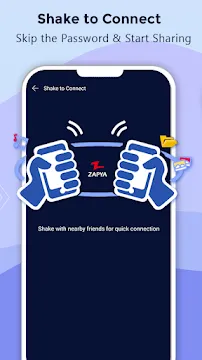
Show your QR code and let others scan it. This creates a secure and quick connection. - Shake to Connect
Simply shake your device to detect and pair with nearby devices using Zapya.
These methods make sharing effortless and fun.
Handling Large and Multiple Files (Bulk Transfer)
Zapya allows you to send files without limits.
There are no size restrictions and no format limitations. You can share:
- Photos
- Videos
- Music files
- Documents
- Applications
Bulk File Transfer
Zapya also supports bulk sharing.
You can:
- Send multiple large files at once
- Transfer entire folders with a single tap
- Share gigabytes of data without delays
This makes Zapya ideal for heavy users and professional workflows.
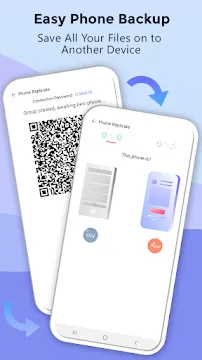
Phone Replication (New Device Setup)
Zapya includes a powerful Phone Replication tool.
It allows you to move everything from your old device to your new one. This feature transfers:
- Apps
- Photos and videos
- SMS messages
- Call logs
- Personal files and folders
With one click, Zapya migrates your data and sets up your new phone quickly. It removes the stress of switching devices.
Advanced Android Support
Zapya stays updated with the latest Android standards.
It works smoothly on modern Android versions, including Android 11+.
Scoped Storage Support
The app follows Android’s scoped storage rules.
This ensures secure, safe, and well-organized file access on your device.
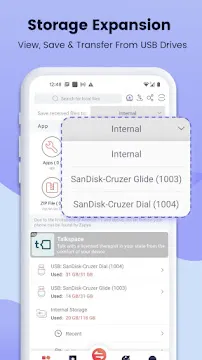
USB Drive Support
Zapya also allows file transfers through USB OTG storage.
You can:
- Copy files directly to a connected USB drive
- Import content from USB storage
- Expand your device storage easily
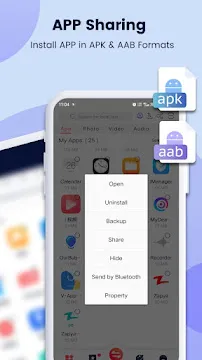
Enhanced App Sharing
Zapya lets you share and install app files effortlessly.
It supports:
- .apk files
- .aab files
This helps users install apps even without an internet connection.
Final Thoughts
Zapya is more than a simple file-sharing app.
It offers fast offline transfers, cross-platform support, bulk sharing, and full phone migration tools. With advanced Android features and flexible connection methods, Zapya remains one of the most reliable sharing apps for Android users.
Additional Key Features of Zapya for Android
High-Speed File Transfer (Lightning Fast Sharing)
Zapya is known for its excellent transfer speed.
It uses local Wi-Fi technology to move files quickly without consuming data.
Key highlights:
- Transfers files at high speeds
- Works smoother than Bluetooth
- Handles both small and large files instantly
- Maintains stable performance during long transfers
This makes Zapya a powerful tool for fast offline sharing.
Easy-to-Use Interface (Beginner-Friendly Design)
Zapya offers a simple and clean interface.
Anyone can understand it without tutorials.
What makes it user-friendly:
- Clear buttons and large icons
- Quick shortcuts for common actions
- Organized menus for photos, videos, apps, and files
- One-tap actions for sending or receiving
Zapya’s design ensures smoother navigation for all ages.
Built-in File Manager (Organize Before Sharing)
Zapya includes a convenient file manager.
You can browse, sort, and select files without using another app.
Main options:
- View files by category
- Delete or rename files
- Sort by date, size, or type
- Preview photos and videos before sending
This helps users organize their device storage effectively.
Group Sharing (Share with Multiple People at Once)
Zapya supports multi-person sharing.
You can create or join a group and send files to several users at the same time.
Benefits:
- Perfect for classrooms or team meetings
- Saves time by avoiding repeated transfers
- Works offline with hotspot or local Wi-Fi
Everyone receives the files instantly, even during bulk transfers.
Clipboard Sharing (Share Text Fast)
Zapya allows quick sharing of simple text.
This includes:
- Links
- Notes
- Short messages
- Passwords
- Contact details
Just copy the text on one device and send it to another with a tap.
This makes Zapya ideal for fast text sharing without typing it again.
Built-in Media Player (Preview Before Sending)
Zapya has a built-in media viewer.
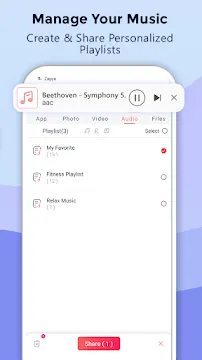
You can play videos, view images, or listen to audio inside the app.
Why it helps:
- Preview files before sharing
- Confirm file quality
- Save time switching between apps
It improves the convenience of managing multimedia files.
QR Code Sharing (Fast and Secure)
Each user gets a personalized QR code.
Scanning this code quickly connects two devices.
Advantages:
- Fast and secure pairing
- No need to search for devices manually
- Ideal for crowded places
It ensures easy and safe device-to-device communication.
Cross-Device Clipboard Sync (Smart Sharing Tool)
Zapya lets you sync copied text between devices.
Whatever you copy on one phone can be shared immediately with another.
Useful for:
- Moving text between Android and PC
- Sharing URLs or short notes
- Copying passwords securely offline
This makes Zapya a productive tool for multitaskers.
Low Resource Usage (Runs Smoothly on All Devices)
Zapya is optimized for performance.
It runs smoothly even on older Android devices.
Performance benefits:
- Low battery usage
- Minimal background activity
- Small app size
- Fast loading time
It works well on high-end and low-end phones.
Multi-Language Support (Global Accessibility)
Zapya supports many languages.
This helps users worldwide understand the app in their native language.
Languages include:
- English
- Arabic
- Spanish
- Chinese
- Hindi
- Many others
This makes Zapya a truly global sharing solution.
Get Zapya Now: How to Download and Install the APK for Android
Zapya lets you share files easily. This cross-platform tool moves files quickly. It transfers apps, videos, and photos much faster than Bluetooth. You can use an APK file to install Zapya on your Android device. An APK is the package file format Android uses for distribution and installation. Follow these simple steps.
Step 1: Adjust Your Phone’s Security Settings
You must first enable installation from unknown sources. This step is crucial for installing any APK file. Your Android phone blocks outside installations by default.
- Go to your phone’s Settings.
- Find the Security or Privacy section.
- Look for “Install unknown apps” or “Unknown sources“.
- Toggle the setting On for the browser you will use for the download.
Note: You accept responsibility for files from outside the official Google Play Store.
Step 2: Download the Zapya APK File
Now, you will download the Zapya installer file. You need a reliable source for the Zapya APK.
- Open your mobile web browser.
- Visit Filetomob.com.
- Search for the Zapya APK Download.
- Look for the “Zapya Android APK” download link.
- Tap the download button.
- Wait for the download to finish. The APK file will save to your phone’s storage.
The file’s size is usually small.
Step 3: Install the Zapya APK
Finally, you install the application. You will use a file manager for this step.
- Open your phone’s File Manager app.
- Navigate to the Downloads folder.
- Find the Zapya APK file. The name usually starts with “Zapya.”
- Tap the file to start the installation.
- A window will pop up. It shows you the permissions Zapya needs.
- Review the permissions. Then, tap the “Install” button.
- The installation process begins. It takes a short time.
After the installation finishes, you will see a confirmation message.
Step 4: Open and Use Zapya
You have successfully installed the app!
- Tap “Open” from the installation screen. Alternatively, you can find the Zapya icon on your home screen or in your app drawer.
- Launch the Zapya app.
- Start transferring files! Share large files with friends quickly.
This simple guide helps you get Zapya working fast.
How to Use Zapya for Android
Zapya makes file sharing fast and simple. You can move photos, videos, apps, and documents without using mobile data. The app works offline and connects devices instantly.
Below, you will learn how to use Zapya step by step.
Step 1: Transfer Files Between Two Phones
Sharing files between two Android phones is easy. Just follow these clear steps.
On the Sender’s Phone
- Open the Zapya app.
- Tap “Send.”
- Select your files.
- Wait for the receiver to connect.
On the Receiver’s Phone
- Open Zapya.
- Tap “Receive.”
- Wait for the sender’s device to appear.
- Tap to connect and start the transfer.
Tip: Look for the connection animation. It helps you confirm that both phones are linked.
Zapya will now send the files quickly and securely. The process works offline and does not use any internet data.
Step 2: Connect Your Phone to a PC
You can also transfer files between your Android device and a computer. This method is great for moving large files.
What to Do on Your PC
- Open the Zapya desktop app.
- Or visit web.zapya.com in your browser.
What to Do on Your Phone
- Open the Zapya app.
- Tap “Connect to PC.”
- Scan the QR code shown on your computer.
- Or enter the PC’s IP address manually.
Start Transferring Files
Drag and drop files between your phone and PC.
Zapya will move them instantly.
You stay in control the entire time.
Final Notes
Zapya for Android is quick, reliable, and easy to use. With just a few taps, you can share files across phones or connect to a computer.
Use these steps anytime you need fast, wireless transfers.
Zapya vs. The Competition: A Quick Look at File Sharing
Need to share a large file quickly? Zapya provides a powerful solution. However, the file-sharing market is crowded. Let’s compare Zapya against its main rivals. This quick look shows where Zapya truly excels.
Zapya vs. SHAREit: Focus on Security
SHAREit is a very popular file transfer app. But, it has often faced security concerns. Users worry about their data privacy.
- Zapya positions itself as a reliable alternative.
- We prioritize a safer sharing experience.
- Security is a key feature for Zapya users.
- Choose Zapya for secure, dependable file transfers.
Zapya vs. Xender/FileDrop: Unique Features
Other apps like Xender and FileDrop offer fast transfers. Zapya adds unique functionality to this mix. It goes beyond simple one-on-one sharing.
- Zapya has a better group sharing feature.
- You can send the same file to multiple people at once.
- Users report a more stable connection with Zapya.
- The connection holds up, even with very large files.
- Zapya delivers both speed and convenience for teams or groups.
Zapya vs. Bluetooth: The Speed King
Many people still use Bluetooth for file transfer. Bluetooth is slow. It is especially slow with modern, large file sizes.
- Zapya is the clear winner in speed.
- It is hundreds of times faster than Bluetooth.
- Transfer entire movies in minutes, not hours.
- Zapya provides extreme convenience for large file transfers.
- Upgrade your sharing method today.
Zapya vs. Google Files: Cross-Platform Power
Google Files (formerly Files by Google) is a great utility app. It helps you clean up phone storage. Its Nearby Share feature works well on Android phones. However, Zapya offers broader utility.
- Google Files is excellent for phone cleanup tasks.
- It shines for Android-to-Android nearby share.
- Zapya excels in raw transfer speed for huge files.
- More importantly, Zapya offers true cross-platform sharing.
- You can easily transfer files between Android and iOS (iPhone/iPad).
- Zapya connects your whole digital life, regardless of the operating system.
Zapya offers a fast, reliable, and versatile file-sharing platform. We focus on cross-platform ability and a stable connection.
Zapya for Android: Pros and Cons
Zapya is a powerful file-sharing app for Android. It helps you send photos, videos, apps, and documents in seconds. It works without mobile data or Wi-Fi, which makes it a great tool for fast and offline sharing.
The app focuses on speed and simplicity. It offers a clean interface and supports many devices and platforms. Still, like any tool, it has strengths and weaknesses. Below is a clear breakdown to help you decide if it fits your needs.
The Pros of Using Zapya
Zapya offers several strong benefits. These features make it a top choice for many users.
- Extremely Fast Transfer Speeds: Zapya truly excels here. You experience speeds much faster than Bluetooth. Large files move in seconds, not minutes. This saves you valuable time.
- Truly Offline and Data-Free: You do not need Wi-Fi or mobile data. Zapya creates its own network. This means you can share files anywhere . Consequently, you save on data costs.
- Excellent Cross-Platform Support: Zapya does not limit you to Android. It connects with iOS, Windows, and Mac. Therefore, sharing files between different operating systems is simple.
- Simple and Intuitive User Interface: The app features a clean design. Users find the interface easy to navigate. You locate files and start transfers without any hassle.
- Powerful Group Sharing Feature: You can share content with multiple people at once. Zapya allows you to create a sharing group. Thus, you send a file to many friends simultaneously.
The Cons of Using Zapya
While Zapya is great, users should know about a few drawbacks. These points are important for a balanced view.
- Requires Both Devices to Have the App Installed: This is a standard requirement for file-sharing apps in this category. Namely, both the sender and receiver must install Zapya. You cannot send files to a device without the app.
- Can Drain Battery Faster During Large Transfers: High-speed transfers use significant power. In short, sending many large files can quickly use your battery. Users should monitor battery levels during long sessions.
- Contains Ads: The free version of Zapya displays advertisements. These ads can sometimes interrupt the user experience. However, you can easily remove the ads. Users simply purchase the Pro version for an ad-free experience.
Should You Use Zapya?
Zapya remains one of the fastest file-sharing options available. It provides unmatched speed and offline capability. To summarize, the benefits of data-free, fast, and cross-platform sharing often outweigh the cons. Consider Zapya if you need to move large files quickly and without the internet.
Frequently Asked Questions about Zapya For Android
What Exactly is Zapya?
Zapya is a file-sharing application. It lets you send and receive files without using mobile data. Instead, it creates a direct local Wi-Fi network between devices. Think of it as a super-fast digital courier for your photos, videos, apps, and more.
How Does Zapya Work Without Internet?
Zapya uses a technology called peer-to-peer (P2P) connection. Here is the simple process:
- Create a Network: One user opens Zapya and creates a group. Their phone becomes the “host” of a local Wi-Fi hotspot.
- Connect: Other users join this group by scanning a QR code or connecting to the same network within the app.
- Share Instantly: Once connected, you can select any file and send it directly to another device. The transfer happens offline at blazing speeds.
Is Zapya Free to Use?
Yes, Zapya is completely free. There are no subscription fees or hidden charges. You can share an unlimited number of files without paying anything.
Is it Safe to Use Zapya on My Android Phone?
Generally, Zapya is safe. It is a reputable app with millions of users. However, you should always follow these safety tips:
- Always check and update Zapya App from the Google Play Store.
- Be cautious when receiving files from unknown people.
- Pay attention to the permissions the app requests during installation.
Why Do I Need So Many Permissions?
Zapya requests permissions to function properly. For example:
- Storage Access: To read and save the files you want to share or receive.
- Location Permission: On newer Android versions, this is often required to find and connect to other devices via Wi-Fi Direct.
- Camera Permission: To scan QR codes for quick group joining.
What Kinds of Files Can I Transfer?
You can share almost any file type. Zapya supports:
- Photos and Images
- Videos and Movies
- Music and Audio Files
- Documents (PDF, Word, Excel)
- APK (App) files
- Entire Folders
What is the Maximum File Size Limit?
There is no strict maximum file size. Zapya can handle very large files, including full-length HD movies. The main limitation is the available storage space on your receiving device.
Can I Use Zapya to Share Files with iPhones or PCs?
Absolutely. Zapya is a cross-platform tool. You can easily share files between:
- Android and iPhone
- Android and Windows PC
- Android and Mac
Simply ensure all devices have the Zapya app installed (or the desktop version for computers).
The Transfer Speed is Slow. What Can I Do?
If your transfers are slow, try these simple fixes:
- Move Closer: Ensure devices are within a few feet of each other. Walls and distance can weaken the signal.
- Check Interference: Other Wi-Fi networks or electronic devices can cause interference.
- Restart the App: Sometimes, simply closing and reopening Zapya can resolve speed issues.
How Do I Receive a File Someone is Sending Me?
Receiving files is straightforward.
- Make sure both you and the sender have Zapya open.
- The sender selects the files and chooses your device name.
- You will see a notification on your screen. Simply tap “Accept” to start the download.